Why This Matters
If you're running microservices on AWS ECS, you've probably hit this wall: your services need to talk to each other, but container IP addresses keep changing. How do you make services discoverable without hardcoding IP addresses?
AWS offers two solutions: Service Connect and Service Discovery. At first glance, they seem to do the same thing—help services find each other. But they're designed for different scenarios, and choosing the wrong one can lead to unnecessary complexity or missing capabilities.
In this guide, I'll break down when to use each approach and show you exactly how to implement them with Terraform.
Understanding Amazon ECS and Microservices

AWS describes ECS as "a fully managed container orchestration service that makes it easy to deploy, manage, and scale containerized applications." That's accurate, but it's not immediately clear how it works under the hood.
To understand ECS, let's first revisit microservices architecture.
From Monoliths to Microservices
In traditional monolithic architecture, all functionality lives in one large application. This works fine when you're starting out, but as your application grows, you run into problems:
- Deploying a small change means redeploying the entire application
- The codebase becomes harder to test and maintain
- Scaling specific features independently is nearly impossible
Microservices architecture solves these problems by breaking your application into small, independent services.
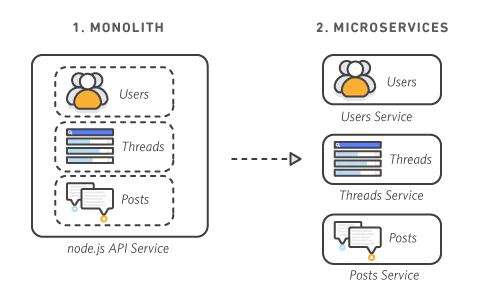 Source: AWS - The Difference Between Monolithic and Microservices Architecture
Real-World Example: E-Commerce Platform
Let's say you're building an e-commerce site. With microservices, you might split it like this:
- Frontend Service → User interface (Next.js)
- User Service → Authentication and user management (Go)
- Product Service → Catalog and inventory (Go)
- Order Service → Order processing and payment (Go)
- Recommendation Service → Product recommendations (Python + ML)
This separation gives you powerful advantages:
- Independent Scaling: When you run a flash sale, you can scale up just the Order Service without touching the Recommendation or Product services.
- Better Performance Through Separation: The Order Service can respond immediately after an order is placed, while heavy tasks like image processing or report generation run asynchronously in separate services. Since each service scales independently, one service's heavy workload won't impact the others.
- Limited Blast Radius: If the Recommendation Service crashes, customers can still place orders. Failures are isolated to individual services.
- Technology Flexibility: Use the right tool for each job — Next.js for the frontend, Python for ML-heavy recommendations, and Go for high-performance backend services.
How ECS Fits In
This is where ECS comes in. It runs and manages these services as containers, providing:
- Environment Isolation: Each service can use different languages, libraries, and dependencies
- Flexible Resource Allocation: Configure CPU and memory for each service independently
- Automated Orchestration: Handles startup, shutdown, placement, and scaling
In simple terms, ECS is an AWS service that automatically manages and scales your containerized microservices.
Note: AWS also offers Amazon EKS (Elastic Kubernetes Service) for running Kubernetes. ECS is simpler and AWS-native, while EKS gives you access to the broader Kubernetes ecosystem.
Key ECS Components
Let's break down the core building blocks:
- Cluster: A logical grouping that represents your entire container environment
- Task Definition: A blueprint that specifies which containers to run and how (resources, networking, logging)
- Task: A running instance based on a task definition (can contain multiple containers)
- Service: Ensures your application keeps running by maintaining a specified number of tasks, handling restarts, scaling, and load balancing
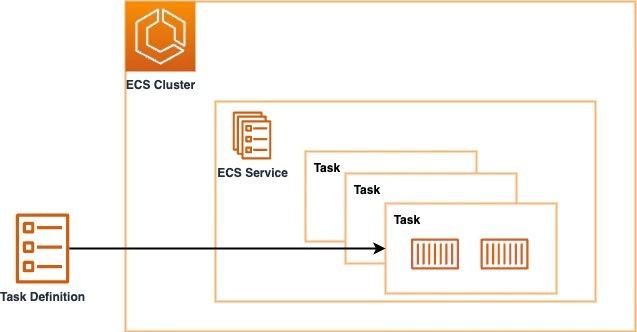 Source: AWS ECS Immersion Day
The Service Discovery Problem
Here's where things get tricky.
In microservices, services need to communicate. The Order Service needs to verify user authentication with the User Service. The Product Service needs to check inventory before confirming an order.
But there's a fundamental problem: How do services find each other when IP addresses keep changing?
ECS tasks don't have static IP addresses. They change when:
- Tasks restart
- You scale out or scale in
- You deploy a new version
- Infrastructure failures occur
Hardcoding IP addresses in your configuration files would be a nightmare—you'd need to update them constantly.
AWS provides solutions to this problem. Let's focus on the two main approaches: Service Connect and Service Discovery.
Solution 1: Service Connect
Service Connect is an ECS-native feature designed specifically for communication between ECS services. It enables standardized handling of inter-service communication with built-in observability, traffic control, and reliability features.
How It Works
Service Connect works by automatically injecting an Envoy sidecar (a proxy container) into each task. Envoy handles all the routing logic.
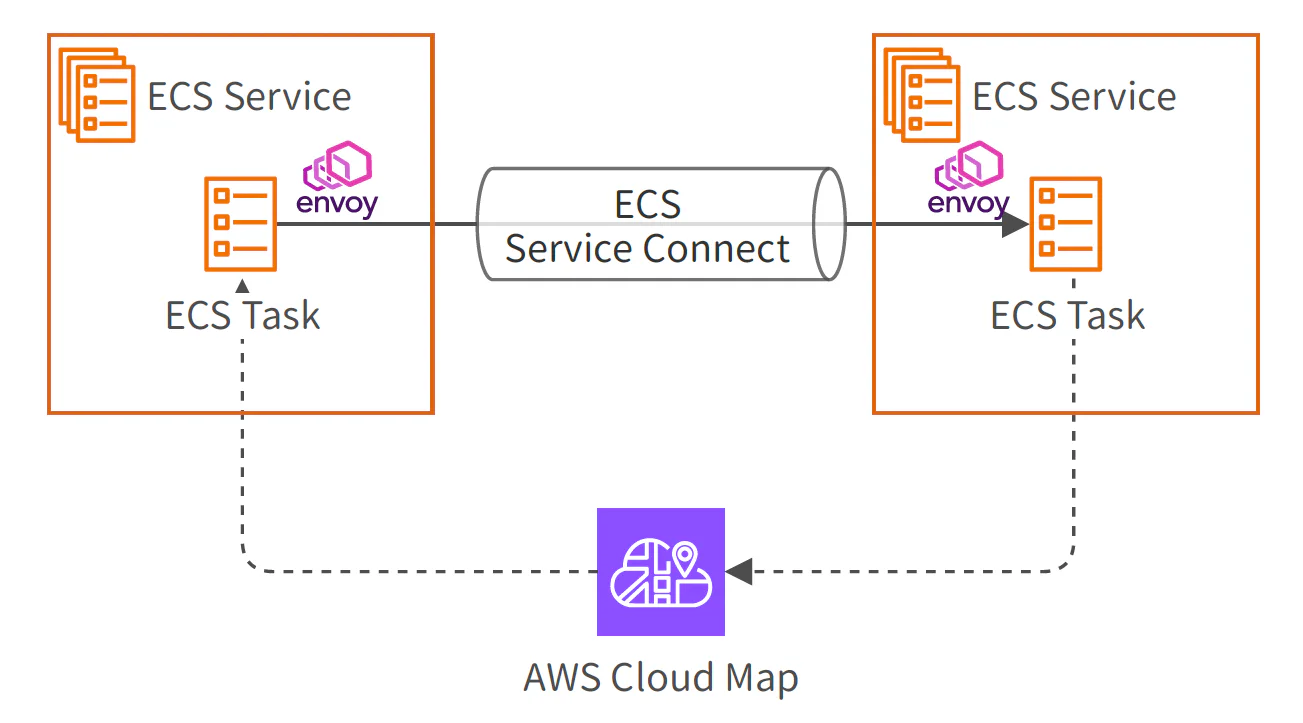 Source: AWS Builders Flash - Web Application Architecture Design Patterns
Here's what makes it powerful:
- Name-Based Routing: Your application containers don't need IP addresses. They connect to other services using simple endpoint names like
my-app:8080. - Automatic Traffic Routing: When a container tries to connect to a service name, the Envoy sidecar intercepts the request and routes it to the correct destination IP and port.
- Built-In Observability: Envoy automatically collects metrics like request counts, latency, and error rates, sending them to CloudWatch. You get visibility into inter-service communication without instrumenting your code.
Important Limitation
Service Connect only works between ECS tasks that have Service Connect enabled.
If you need to access ECS tasks from outside ECS—such as from Lambda functions, EC2 instances, or other AWS services—Service Connect alone won't work. You'll need an alternative approach like Service Discovery or an Application Load Balancer.
Solution 2: Service Discovery
Service Discovery takes a different approach. Instead of using a sidecar proxy, it relies on DNS-based name resolution using AWS Cloud Map and Route 53.
This solution works not just for ECS, but for any AWS resource: EC2, Lambda, EKS, or even on-premises servers.
How It Works with AWS Cloud Map
AWS Cloud Map provides two methods for service discovery:
- DNS-based: Automatically registers DNS records in Route 53's private hosted zone (e.g.,
my-service.local) - API-based: Services call Cloud Map's API directly to find endpoints (useful when DNS isn't available)
ECS Service Discovery uses the DNS-based approach. When a task starts, it's automatically registered in Cloud Map and becomes resolvable via DNS. When it stops, it's automatically removed.
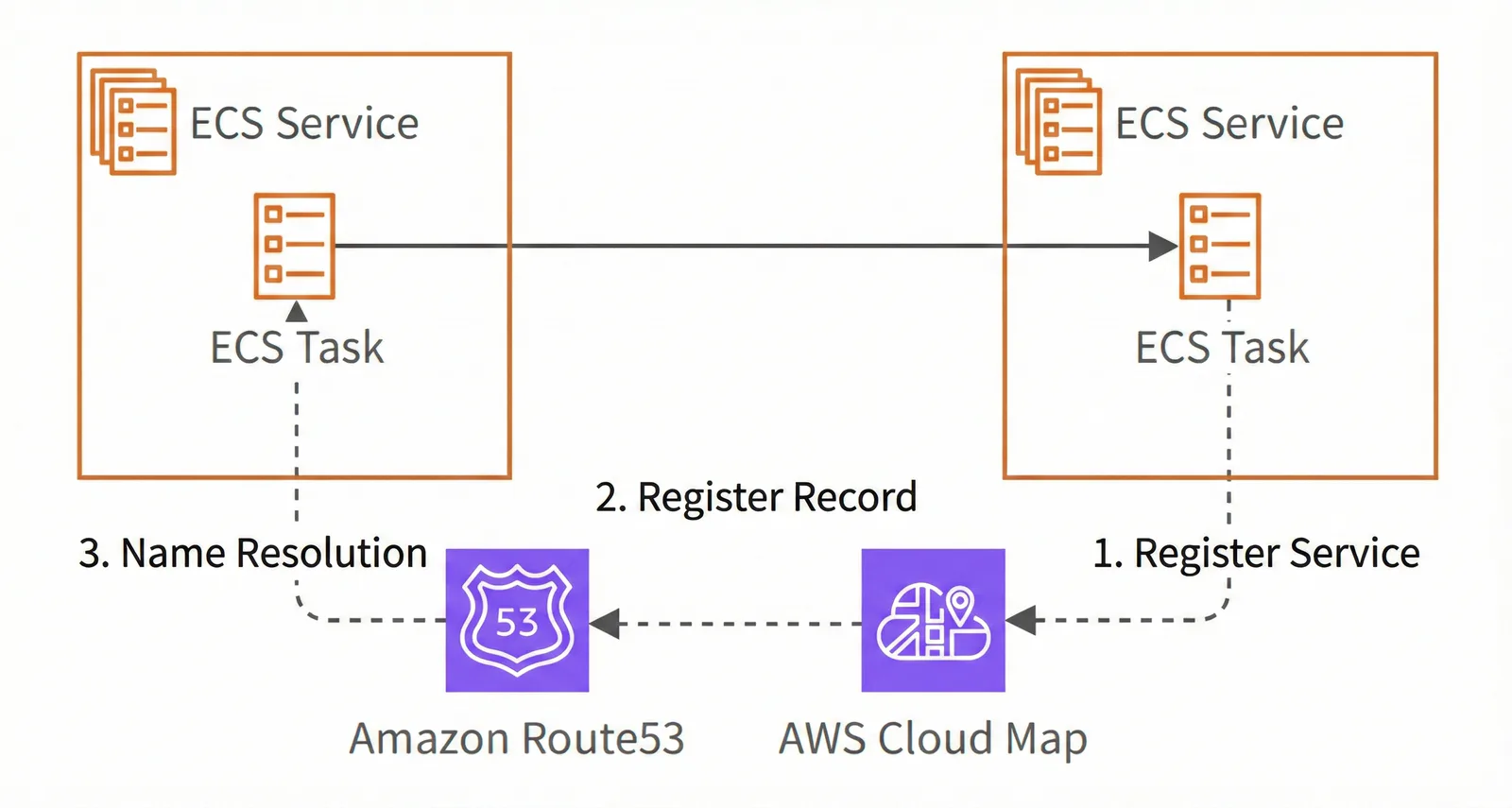 Source: AWS Builders Flash - Web Application Architecture Design Patterns
Key Benefits
- Universal Access: Any service within your VPC can access ECS tasks using DNS names — Lambda functions, EC2 instances, other ECS services, or internal systems.
- Standard DNS Resolution: No special client configuration needed. Services use standard DNS lookups to find endpoints.
- Automatic Registration: Tasks are registered and deregistered automatically as they start and stop.
Service Connect vs Service Discovery: When to Use Each
The choice depends on who's communicating with whom.
Use Service Connect When:
- ECS services need to communicate with each other
- You want built-in observability and traffic control
- You need advanced features like retries, timeouts, and circuit breakers
- All communication is ECS-to-ECS
Use Service Discovery When:
- Services outside ECS need to access ECS tasks (Lambda, EC2, etc.)
- You want simple DNS-based resolution
- You need broad compatibility across AWS services
- You're integrating with non-ECS resources
Quick Comparison
| Feature | Service Connect | Service Discovery |
|---|---|---|
| Target Audience | ECS-to-ECS only | Any AWS service |
| Name Resolution | Endpoint names via Envoy | Standard DNS via Route 53 |
| Capabilities | Observability, traffic control, retries | Basic name resolution |
| Additional Components | Envoy sidecar added to tasks | None |
| Best For | Microservices communication | VPC-wide resource access |
Can You Use Both?
Absolutely! In fact, you often should.
For example, you might use:
- Service Connect for ECS service-to-service communication (to get observability benefits)
- Service Discovery for Lambda or EC2 to access the same ECS tasks
They're complementary, not mutually exclusive.
Implementing with Terraform
Let's walk through how to set this up step by step. I'll focus on the ECS-specific configuration and omit peripheral setup like VPC, subnets, and IAM roles for clarity.
Part 1: Basic ECS Setup
First, let's establish a baseline configuration with a cluster, task definition, and service.
hcl# ECS Cluster
resource "aws_ecs_cluster" "main" {
  name = "my-cluster"
}

# Task Definition
resource "aws_ecs_task_definition" "app" {
  family                   = "my-app"
  network_mode             = "awsvpc"       # Assigns VPC IP addresses
  requires_compatibilities = ["FARGATE"]    # Serverless mode
  cpu                      = "256"          # 0.25 vCPU
  memory                   = "512"          # 512 MB

  # Role for ECS to pull images and write logs
  execution_role_arn = aws_iam_role.ecs_execution.arn

  container_definitions = jsonencode([
    {
      name  = "app"
      image = "my-app:latest"

      portMappings = [
        {
          containerPort = 8080
          protocol      = "tcp"
        }
      ]
    }
  ])
}

# ECS Service
resource "aws_ecs_service" "app" {
  name            = "my-app-service"
  cluster         = aws_ecs_cluster.main.id
  task_definition = aws_ecs_task_definition.app.arn
  desired_count   = 2          # Maintain 2 running tasks
  launch_type     = "FARGATE"

  network_configuration {
    subnets         = ["subnet-xxx", "subnet-yyy"]
    security_groups = ["sg-zzz"]
  }
}
This is your foundation. Now let's add Service Connect.
Part 2: Adding Service Connect
Service Connect requires configuration in three places: the cluster, task definition, and service.
Step 1: Create a Cloud Map Namespace
First, create a namespace for Service Connect. This is a logical grouping that helps organize services.
hcl# Cloud Map namespace for Service Connect
resource "aws_service_discovery_private_dns_namespace" "sc" {
  name = "sc.local"
  vpc  = aws_vpc.main.id
}Important: Service Connect uses this namespace for logical grouping. The name sc.local is not externally queryable as a regular DNS record. Actual name resolution happens through the Envoy proxy inside tasks.
Step 2: Configure the Cluster
Add the Service Connect namespace to your cluster.
hclresource "aws_ecs_cluster" "main" {
  name = "my-cluster"

  service_connect_defaults {
    namespace = aws_service_discovery_private_dns_namespace.sc.arn
  }
}
Step 3: Update the Task Definition
Add a name to your port mapping. This name is critical—it links the task definition to the Service Connect configuration.
hclresource "aws_ecs_task_definition" "app" {
  # ... other settings unchanged

  container_definitions = jsonencode([
    {
      name  = "app"
      image = "my-app:latest"

      portMappings = [
        {
          name          = "http"  # Must match Service Connect port_name
          containerPort = 8080
          protocol      = "tcp"
        }
      ]
    }
  ])
}
Step 4: Enable Service Connect in the Service
Add the service_connect_configuration block to your ECS service.
hclresource "aws_ecs_service" "app" {
  # ... other settings unchanged

  service_connect_configuration {
    enabled = true  # Automatically adds Envoy sidecar to each task

    service {
      # Must match portMappings[].name in task definition
      port_name      = "http"
      # Name registered in Cloud Map (internal to Service Connect)
      discovery_name = "my-app"

      # Endpoint name that other services use to connect
      client_alias {
        dns_name = "my-app"
        port     = 8080
      }
    }
  }
}
How the Pieces Connect
Let's trace through the configuration:
- Cluster defines the namespace—a logical boundary for Service Connect services
- Task Definition declares which port to expose using
portMappings[].name - Service links everything together with
service_connect_configuration
The critical linkage: portMappings[].name must match service_connect_configuration.service.port_name. If these don't align, Service Connect won't work.
Important Note on Security
The namespace is just a logical grouping within Service Connect. It doesn't provide security isolation.
Actual communication permissions are controlled by Security Groups and Network ACLs. Separating namespaces doesn't automatically create security boundaries.
Automatic Cloud Map Registration
When you specify a discovery_name, ECS automatically registers the service in Cloud Map. However, this registration is internal to Service Connect.
Only tasks with Service Connect enabled can resolve these names. Lambda functions, EC2 instances, and other non-ECS services cannot access your tasks using Service Connect names alone.
For external access, you need Service Discovery.
Part 3: Adding Service Discovery
Use Service Discovery when you need to access ECS tasks from outside ECS—Lambda functions, EC2 instances, or other services in your VPC.
Step 1: Create a Separate Namespace
Create a distinct namespace for Service Discovery. This one actually registers DNS records in Route 53.
hcl# Cloud Map namespace for Service Discovery
resource "aws_service_discovery_private_dns_namespace" "sd" {
  name = "sd.local"
  vpc  = aws_vpc.main.id
}
Why separate namespaces? Service Connect and Service Discovery work differently:
- Service Connect manages Cloud Map internally and automatically
- Service Discovery requires explicit DNS record configuration
Keeping them separate makes the configuration clearer and easier to maintain.
Step 2: Create a Cloud Map Service
Unlike Service Connect, you need to explicitly configure DNS records for Service Discovery.
hcl# Cloud Map Service for Service Discovery
resource "aws_service_discovery_service" "app" {
  name = "my-app"  # Creates "my-app.sd.local"

  dns_config {
    namespace_id = aws_service_discovery_private_dns_namespace.sd.id

    dns_records {
      ttl  = 10
      type = "A"
    }

    routing_policy = "MULTIVALUE"  # Returns all healthy IPs
  }

  health_check_custom_config {
    failure_threshold = 1
  }
}
Step 3: Link to Your ECS Service
Add the service_registries block to your ECS service (separate from service_connect_configuration).
hclresource "aws_ecs_service" "app" {
  # ... other settings unchanged

  # Automatically register task IPs in DNS
  service_registries {
    registry_arn   = aws_service_discovery_service.app.arn
    container_name = "app"
    container_port = 8080
  }
}
Configuration Flow
Service Discovery has a more explicit structure:
- Define Cloud Map namespace (
aws_service_discovery_private_dns_namespace) - Define Cloud Map service (
aws_service_discovery_service) - Reference in ECS service via
service_registries
Now your tasks are accessible at my-app.sd.local from anywhere in your VPC.
Putting It All Together
We've covered the fundamentals of inter-service communication in ECS through Service Connect and Service Discovery.
Key Takeaways
These aren't competing solutions—they're complementary:
- Service Connect: Use for ECS-to-ECS communication when you want observability, traffic control, and advanced routing
- Service Discovery: Use when non-ECS services need to access your tasks via standard DNS
- Both Together: Perfectly valid. Use Service Connect for microservices and Service Discovery for external access to the same tasks
Other Options
There are additional patterns for ECS networking, such as using an internal Application Load Balancer.
One important note: AWS App Mesh is being retired on September 30, 2026. If you're currently using App Mesh, AWS recommends migrating to Service Connect. Check out the official migration guide: Migrating from AWS App Mesh to Amazon ECS Service Connect.
What's Next?
Understanding ECS networking is crucial for building resilient microservices.
By diving into areas I don't encounter in day-to-day work, I've gained a much deeper understanding of how ECS really works.
If you found this helpful, consider following for more AWS deep dives.